How suggestions are checked: verify, repair, escalate
Some printed values can be read more than one way: a decimal separator that could be a thousands separator, or a day and month that could be swapped. Where suggestions are switched on for that kind of value, DocSolved verifies the value, proposes a repair only if the page settles it, and otherwise escalates the decision to you.
What you will learn
Section titled “What you will learn”- Follow the three steps: verify, repair, escalate.
- Read How this was checked and decide whether you agree.
- Know what you see when nothing is suggested.
Time: about 5 minutes.
Before you start
Section titled “Before you start”- You are signed in to DocSolved.
- You have an open issue on an amount or date that can be read more than one way, such as 1.234 (1.23 or 1,234.00?).
The three steps
Section titled “The three steps”-
Verify (Check). The value is compared with the page and with the document’s other figures.
-
Repair (Suggest). If the page settles which reading is meant, that reading is marked Suggested. Fixed rules are tried first; for some values an AI reading may be proposed instead. Either way, a suggestion is shown only after it passes the Independent check: it is a reading of the printed value, the page confirms it, and it causes no new problem in the checks.
-
Escalate (Leave it to you). If nothing passes that check, nothing is suggested. Why nothing is suggested explains the reason, and you choose the reading yourself.
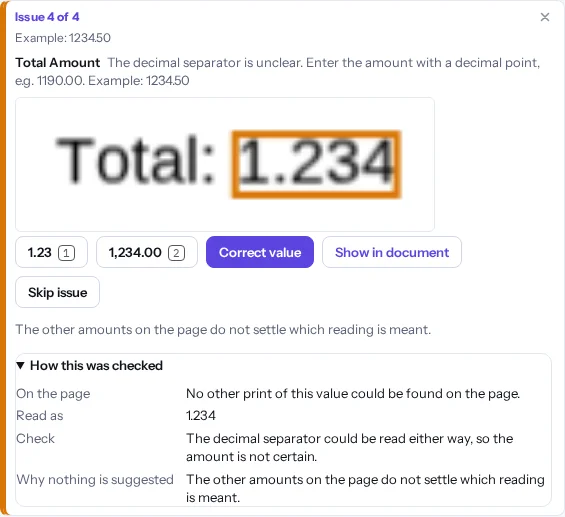
Nothing is suggested here: the page prints no other version of this total. The explanation names the reason.
Open full size (opens in a new tab)
Act on a suggestion
Section titled “Act on a suggestion”-
Open the issue. The suggested reading is the highlighted button and carries a small Suggested tag. A note under the buttons says “Suggested from the page: … You decide.”
-
Select How this was checked. It lists what the page shows (On the page), what was read (Read as), the Check that failed, the Suggested reading and the Independent check.
-
Decide:
- Select the Suggested reading to confirm it.
- Choose another reading, or type a value, to correct the field yourself.
- Select Dismiss suggestion to discard it and decide yourself.
Expected result
Section titled “Expected result”The field holds the reading you confirmed or typed, and the issue is closed. If nothing was suggested, the issue stays open until you choose the reading.
Check your result
Section titled “Check your result”- A confirmed suggestion leaves a line such as “Total Amount set to EUR 1,190.00 from the suggestion you accepted.” with Undo.
- Without a suggestion, Why nothing is suggested tells you what stopped it, and the issue stays in the list.
Try it yourself
Section titled “Try it yourself”You need: an open issue on an amount or date. If you have none, use the screenshot above. Nothing here changes your document.
- Open the issue and select How this was checked.
- Read On the page and Read as, and say in your own words why the page does or does not settle the reading.
- If a Suggested reading is shown, compare it with the page before you accept it.
You should see: the details under the issue. They end with Why nothing is suggested when no reading passed the check.
No open issue? In the screenshot above, why does nothing carry the Suggested tag?
Show the answer
On the page says that no other print of this value could be found, and Why nothing is suggested says that the other amounts on the page do not settle which reading is meant. So 1.234 could be 1.23 or 1,234.00, and you choose.